Skip to content

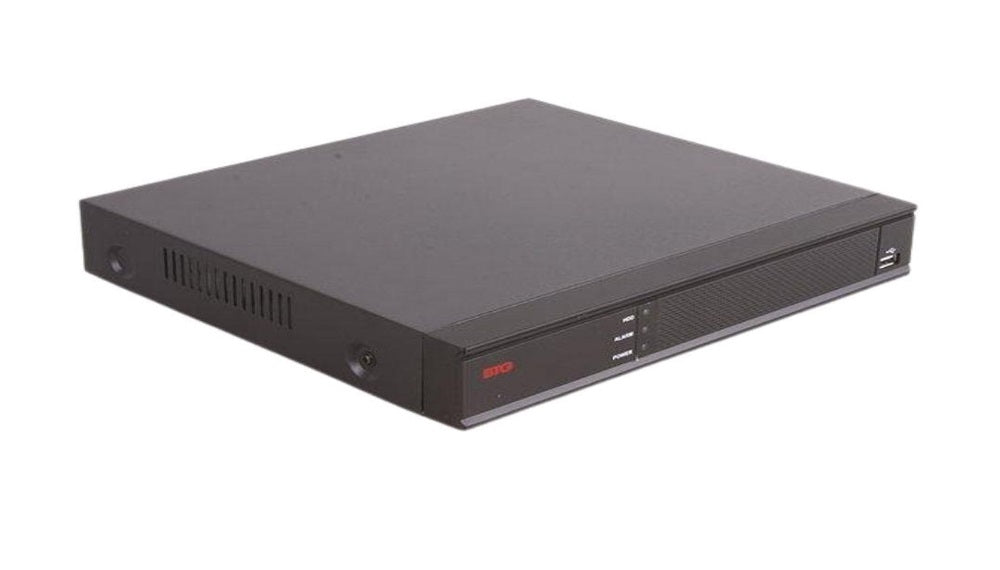
Quick answer: An NVR (network video recorder) is a device that records and stores video from IP security cameras over a network. The cameras encode the video, and the NVR saves it to hard drives and lets you search, play back and view it remotely.
It is almost impossible to find a medium-scale or large-scale business without a network video recorder (NVR) system, due to the ever-growing importance of video surveillance in the security of any business. But what exactly is an NVR?
In today's security landscape, video surveillance is critical to ensuring the safety of people, equipment, and products on any property (commercial or private). Most modern security systems have come to rely on NVRs for a robust and scalable solution for recording and managing video footage.
In this comprehensive guide, we delve into the world of NVR technology, explaining how it works, its features, and the benefits it offers over traditional video recording methods. We also talk about DVRs and how they compare with NVRs, and we cover storage sizing and security tips.
What Is a Network Video Recorder (NVR)?
An NVR is a dedicated computer designed for the specific purpose of recording and managing video footage captured by IP (Internet Protocol) cameras. They are usually compared and contrasted with the earlier Digital Video Recorders (DVRs), which capture footage from analog cameras.
However, NVRs work with digital IP cameras and offer several modern benefits in terms of superior image quality, better scalability, and overall functionality.
NVRs do not capture or encode video themselves. Instead, they rely on IP cameras to process and encode video before it is transferred to the NVR via a wired or wireless network.
To fully understand what makes NVR special, we need to provide a quick overview of what came before NVRs: DVR. Digital video recorders are connected to analog cameras and do not record video using a network cable or via a wireless local network.
Instead, DVRs receive the video over coaxial cables and encode it in the recorder. Older analog DVRs are limited in scalability and output quality, and often top out at a resolution of 720 x 576, which, by today's resolution standard, is simply inadequate. Newer HD-over-coax DVRs (HD-TVI, AHD, HDCVI) and hybrid recorders can reach higher resolutions, but they still lack the flexibility of IP systems.
NVRs typically offer more flexible recording options, support higher resolutions, and can be accessed from anywhere as long as there is internet access.
How Does an NVR Work?
Below is a quick overview of the core functionalities that NVRs offer and how these functionalities interact with IP cameras:
-
IP Cameras: IP cameras and NVRs work as a unit. The function of the IP camera is to capture video footage and convert it to a digital stream (with audio included when equipped). The digital output/stream is sent over a network to the NVR. The network used is typically a Local Area Network (LAN), using Ethernet cables or a Wi-Fi connection.
-
Video Streaming: The digital video stream from the IP security camera is transmitted over a network to the NVR. Modern NVRs allow input from multiple IP cameras at once, allowing for the implementation of a comprehensive security system.
-
Video Processing and Recording: The camera compresses the video with a codec like H.264 or the more efficient H.265 before sending it. After receiving the stream, the NVR records it to the hard drives inside the NVR or to an external storage device, usually without re-encoding. The NVR only decodes the stream when you view live video or play back footage. Compression reduces the storage requirements of each recording without compromising on image quality.
-
Playback and Management: Users can access the stored footage on the NVR and perform actions such as playback, searching, and exporting. Most NVRs, like the UNV NVR304-32S-P16 and the Bolide BTG-BN-NVR/8NX-S/NDAA, offer user-friendly interfaces that allow users to filter footage by date, time, specific camera, or motion-detected activities.
-
Remote Access: One of the best features of NVRs is the ability to offer users access to live video feeds and recorded footage remotely. This is typically done using a dedicated application on a computer or mobile device. This means users can monitor their surveillance system from anywhere as long as they have an internet connection. Secure it properly: change default passwords, keep firmware updated, and use a VPN or the manufacturer's secure cloud service instead of opening ports on your router.
Key Features Offered by NVRs
The features offered by NVRs differ from one brand to another. However, certain features are common among most brands of NVRs, which enhance the functionality and user experience that they offer.
Below are some common features found in most NVRs:
Multi-Channel Support
The ability of an NVR to handle the video streams from multiple cameras simultaneously is called multi-channel support. The number of channels that an NVR supports depends on the model and brand.
The number of channels that can be handled by an NVR ranges from a few channels for basic setups to dozens of channels for large-scale security systems. Check each model's datasheet for its exact channel count.
High-Definition
Video technology has continued to advance at a very rapid pace, and this has made it possible for modern NVRs to be capable of recording video footage in high-definition resolutions such as 720p, 1080p, and 4K Ultra HD in some cases. This means many NVRs can provide video footage that is clear enough for thorough forensic purposes.
Video Compression
Video compression is a necessary feature for every NVR as this is the only way to make sure they can continue to record and store video streams for a long time before their storage devices become full.
The goal is usually to retain video quality while significantly reducing the size of the video footage. Common compression codecs used include:
-
H.264: Widely supported and decoded by most systems.
-
H.265: The successor to H.264. It offers better compression and retains more of the video quality, so the same footage takes up less storage.
Video Analytics
Advanced NVRs offer advanced features like video analytics, which can automatically detect motion, objects crossing specified boundaries, or unauthorized access attempts.
These types of NVRs can be connected to an alarm system or a more elaborate perimeter surveillance system, which sets off alarms, sends notifications, and begins recording when certain events occur.
Remote Access and Management
An NVR camera system typically allows remote access to live feeds and recorded footage via the Internet using dedicated software offered by the NVR brand.
Integration With Other Systems
Some NVRs provide users with integration capabilities with other security systems, such as access control systems or perimeter detection alarms. This means users can have a centralized and synchronized security infrastructure.
Advantages of NVRs Over DVRs
Digital video recorders (DVR camera systems) used to be the traditional choice for video surveillance. The arrival and adoption of the NVR security system by businesses and homeowners have reduced the use of DVR camera systems drastically due to the number of advantages that NVRs offer compared to DVRs.
These advantages include:
Superior Image Quality
Since NVRs are paired with an IP security camera, they offer superior image resolution and clarity compared to the traditional analog cameras used with DVRs. This allows for better surveillance for clear pieces of evidence and forensic purposes.
Scalability
NVRs can be easily scaled to accommodate additional IP cameras as your security needs evolve, as long as the NVR system you are using allows for extra channels.
This is exceedingly better than DVRs, which typically have a limited number of channels and may require the addition of a new recorder if the number of cameras increases.
In the case of NVRs, you can simply install a new IP camera and configure it to the NVR, allowing for a more comprehensive security system.
Digital Signal Transmission
Since NVRs use a digital network to transmit video data, they do not suffer the signal degradation that occurs with analog video transmission systems over a long distance, a problem that occurs in DVR-based systems.
NVRs, therefore, offer consistent image quality and remote viewing over long distances. This allows the IP security camera to be situated in a more flexible location. Keep in mind that Ethernet runs are limited to about 100 m (328 ft) per segment. To go farther, use a switch, a PoE extender or fiber.
Power Over Ethernet (PoE)
Power over Ethernet (PoE) is another superpower that NVRs and IP cameras possess. PoE allows both power and video data to be transmitted over a single Ethernet cable, eliminating the need for a separate power cable for the IP cameras connected to the NVR. This helps to simplify your installation process and reduces your cabling requirements.
NVRs make your surveillance system more efficient and easier to manage. Check an NVR's total PoE budget (in watts), not just its number of PoE ports.
Advanced Features
NVRs typically offer a wider range of advanced features compared to a security DVR. Some of these features include:
-
Video Analytics
-
Motion Detection
-
Object Recognition
-
Facial Recognition
-
Integration with Other Security Systems
These features allow your security to be more intelligent and proactive.
Remote Access and Management
NVRs can be remotely accessed and, in some cases, controlled over the internet. Many current DVRs also offer remote viewing, but NVRs generally offer deeper control and better app integration, making them more flexible.
Future-Proof Technology
Since NVR technology is always advancing, and new features continue to be added to new and existing NVR units, then owning an NVR system ensures that your security system is future-proof.
NVRs are very well-positioned to integrate seamlessly with future security innovations and optimized features.
Choosing the Right NVR for Your Needs
Now that you have a general overview of the features and benefits offered by NVRs, the next step is selecting the right one for your specific needs.
Below are some of the essential factors to consider:
-
Number of Cameras: The first thing you should do when looking to select the best NVR for your property is to determine the number of cameras you are likely to use for your security system. Choose an NVR with enough channels to accommodate your needs and allow for future expansion.
-
Video Resolution: Determine your preferred resolution to record at and choose an NVR that can process video streams in that resolution. Also, you have to consider the extra storage needs that come with higher resolutions.
-
Storage Capacity: The storage capacity of your NVR should be sufficient enough to store the kind of footage you intend to record. You must consider factors like video resolution, frame rate, and recording durations when determining your storage requirements. Some NVRs allow you to store video streams on external storage devices or the cloud, so you can consider these options if your storage needs are extremely large. As a rule of thumb, 1 Mbps of camera bitrate uses about 10.8 GB per day of continuous recording, so 8 cameras at 4 Mbps for 30 days need about 10.4 TB.
-
Features: If features like video analytics, remote access, and integration capabilities are important to you, then you must choose an NVR that offers all of these features.
-
PoE and Compatibility: Check the NVR's number of PoE ports and total PoE budget, and confirm it works with your cameras (ONVIF support or same-brand pairing). If you need NDAA-compliant equipment for federal work or grants, ask your supplier to confirm each model.
-
Budget: Features like the number of available channels, features, and the brand of the specific NVR you choose will influence the cost of the NVR. The more features your NVR offers, the more expensive it is likely to be.
We recommend that you carefully consider your budget before settling on an NVR for your facility.
Ready to compare models? See our best NVR camera systems and best NVR systems for small business security, or browse all NVRs in our shop.
NVR FAQs
What does NVR stand for?
NVR stands for network video recorder. It records video from IP cameras over a network.
What is the difference between an NVR and a DVR?
An NVR records digital streams that IP cameras have already encoded, over Ethernet. A DVR connects to analog or HD-over-coax cameras over coaxial cable and encodes the video itself.
How much storage does an NVR need?
It depends on camera count, bitrate and retention. Every 1 Mbps of camera bitrate uses about 10.8 GB per day, so 8 cameras at 4 Mbps recording continuously for 30 days need about 10.4 TB.
Can an NVR work without internet?
Yes. An NVR records and plays back locally without internet. You only need internet for remote viewing and cloud features.
Shop for the Best NVRs
NVRs have come a long way in revolutionizing video surveillance, offering home and business owners a robust and scalable solution for modern security systems.
The superior image quality, scalability, and advanced integration features like remote access and automated alarm systems that they offer make them the preferred choice for a wide range of applications.
Now that you understand what NVRs are and the advantages that they offer, the next step is shopping for the right NVR for your facility.
All Security Equipment is a one-stop shop for all kinds of security, communications, and surveillance equipment, tools, and accessories required to make your NVR system a complete and effective one.
To ensure that our customers get only the best NVR systems, we only partner with and stock products from globally recognized and trusted brands like UNV and Bolide Technology Group.
Contact us today for consultation on your existing or future NVR system.