Skip to content

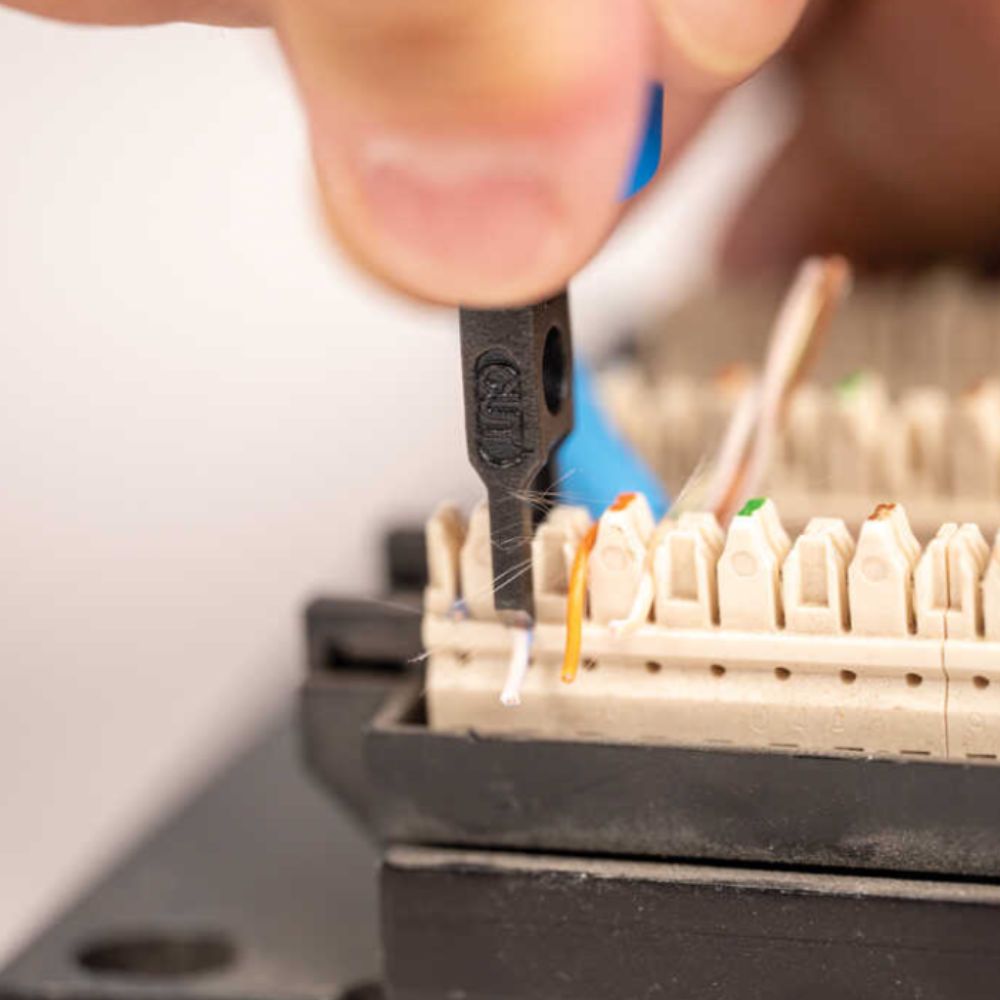
A punch down tool is the hand tool installers use to push each wire of a twisted-pair network cable into the slots of a keystone jack, patch panel or punch down block and trim the extra wire in one stroke. To use one, strip the jacket, lay the wires in T568A or T568B color order, set the blade on each wire with the cut side facing out, and press straight down until the tool snaps.
Many keystone jacks and patch panels for Cat5e and Cat6 use 110-style terminals, while phone and cross-connect blocks can need a 66, BIX or Krone blade. All Security Equipment carries Jonard Tools punch down tools for 110, 66, BIX and Krone blocks.
Punch Down Tool Quick Facts
-
What it terminates: Keystone jacks, patch panels, surface-mount boxes and 66, 110, BIX and Krone punch down blocks.
-
Wire size: 110, 66 and BIX terminals are designed for 22–26 American Wire Gauge (AWG) solid copper wire.
-
Impact force: The Jonard Tools EPD Punchdown Tools have a Hi setting (40 lb) and a Lo setting (30 lb).
-
Untwist limit: The ANSI/TIA-568 cabling standard allows up to 0.5 inch (13 mm) of untwisted pair at the termination for Cat5e and higher.
-
Wiring order: T568A or T568B, with the same order on both ends of the cable.
-
Cut side: The cutting edge faces the outside of the jack. Jonard Tools marks the cut side of its impact tools in yellow.
How Does a Punch Down Tool Work?
An impact punch down tool has three parts: a handle, a spring mechanism inside the handle and a removable blade. When you press the blade over a wire, the spring releases at a set force and drives the wire into an insulation displacement connector (IDC). The sharp edges of the IDC slot cut through the insulation and grip the copper, so you don't strip each wire. A cutting blade trims the extra wire against the block in the same stroke.
The same tool is also sold as an Ethernet punch down tool, an RJ45 punch down tool, an IDC tool or a Krone tool. It terminates the RJ45 jack, not the RJ45 plug: plugs on patch cords are crimped with a tool such as the Jonard Tools 6-in-1 Crimping Tool for RJ45 Pass-through & RJ11/12 Modular.
How to Choose a Punch Down Tool
Choose the blade by the block you're terminating, then choose impact or non-impact by how many connections you'll make.
Match the Blade to the Punch Down Block: 110, 66, BIX or Krone
Each type of punch down block needs a matching blade. Many tools take interchangeable, double-ended blades with a cutting end and a non-cutting end; the non-cutting end seats a wire without trimming it, for wires that continue to another terminal.
|
Tool |
What it terminates |
Jonard Tools option at All Security Equipment |
|---|---|---|
|
110 punch down tool |
110-style blocks and many Cat5e and Cat6 keystone jacks and patch panels |
Jonard Tools PD-110 Non Impact Punch Down Tool, 110 Blade w/ Cutter |
|
66 block punch down tool |
66-style cross-connect blocks for telephone and voice wiring |
Jonard Tools Punchdown Tool with Grip and 2 Blades 66 & 110, which covers both 66 and 110 blocks |
|
BIX punch down tool |
BIX, GigaBIX and UMOXS cross-connect connectors |
Jonard Tools BIX Punchdown Tool, with a button that switches between seating only and seating and cutting |
|
Krone punch down tool |
Krone termination blocks and some keystone jacks and patch panels |
Jonard Tools Punchdown Tool with Scissor Style Krone Blade, with the scissor-style blade Krone terminals need to trim the wire |
Blades dull with heavy trimming. Jonard Tools EPB Punchdown Blades come in 110, 66, Krone and Krone scissor-style versions and fit industry-standard twist-and-lock tools.
Impact vs. Non-Impact Punch Down Tools
An impact punch down tool uses a spring to deliver the same force on every wire, which keeps terminations consistent across a full patch panel. The Jonard Tools Punchdown Tool with Grip and 2 Blades 66 & 110 has Hi (40 lb) and Lo (30 lb) settings and is tested to 100,000 cycles on the high setting. Start on Lo for keystone jacks, and switch to Hi if a wire doesn't seat fully or the end doesn't trim clean.
A non-impact tool has a fixed blade and no spring, so your hand supplies the force. The Jonard Tools PD-110 Non Impact Punch Down Tool, 110 Blade w/ Cutter suits small jobs on 110 blocks, but each wire takes more effort on larger runs.
For 110-style blocks with many pairs, the Jonard Tools Multi-Pair Punch Down Tool for 4 Pair Wire Seating terminates and cuts four pairs in a single punch, including 23 AWG Cat6A cable.
Tools You Need to Terminate Cat6 Cable
To terminate a Cat6 run on keystone jacks or a patch panel, have these ready:
-
Cable: Cat6 cable from the Structured Cable Products collection. IDC terminals are designed for solid conductors, so check that the cable is solid copper.
-
Jacket stripper: The Jonard Tools Universal Cable Stripping Tool has an adjustable hole for Cat3 through Cat6A PVC and plenum cable.
-
Punch down tool: A 110 tool for most Cat6 jacks and panels (see the table above).
-
Keystone jacks or a patch panel: For example, the SCP 24 Port Loaded Shielded 10GBaseT Patch Panel, whose rear IDC modules work with 110 and Krone tools.
-
Punch down stand: Holds the keystone jack steady while you punch.
-
Cable tester: The Jonard Tools MCT-468 Modular Cable Tester for RJ45, RJ12, RJ11 Cables checks RJ45 connections for opens, shorts and miswiring.
For Cat5e jobs, the Jonard Tools VDV Installation Tool Kit is a network tool kit that puts an EPD-914 punch down tool with a 110 blade, a wire stripper, a 6-in-1 RJ45 crimper, scissors and 50 Cat5e pass-through connectors in one case.
T568A and T568B Wiring Order for Keystone Jacks
T568A and T568B are the two standard color orders for eight-wire network jacks. Either order works as long as both ends of the cable use the same one, and T568B is the more common choice. Keystone jacks and patch panels usually print both color codes next to the slots, so follow the label on the part you're terminating.
Use this pin-by-pin wiring diagram to check Cat5e, Cat6 and Cat6A connections:
|
Pin |
T568A |
T568B |
|---|---|---|
|
1 |
White/Green |
White/Orange |
|
2 |
Green |
Orange |
|
3 |
White/Orange |
White/Green |
|
4 |
Blue |
Blue |
|
5 |
White/Blue |
White/Blue |
|
6 |
Orange |
Green |
|
7 |
White/Brown |
White/Brown |
|
8 |
Brown |
Brown |
How to Use a Punch Down Tool on a Keystone Jack
These steps show how to use a punch down tool on a Cat6 keystone jack. The same steps apply to Cat5e and Cat6A jacks.
-
Strip the jacket. Remove only as much jacket as the jack needs, often about 1 inch. Adjust the stripper on scrap cable first so it scores the jacket without nicking the copper.
-
Fan out the pairs and keep the twists. Separate the four pairs, but keep each pair twisted up to the jack. ANSI/TIA-568 allows no more than 0.5 inch (13 mm) of untwist for Cat5e and higher, and Cat6 performs best with as little untwist as you can manage.
-
Lay each wire in its slot. Follow the T568A or T568B colors printed on the jack and press each wire into its slot with your thumb.
-
Set the jack in a punch down stand. The stand holds the keystone jack so the force goes into the wire instead of your hand.
-
Position the blade. Seat a 110 blade over the first wire with the cut side toward the outside of the jack. If the blade faces in, it cuts the wire inside the jack.
-
Punch down. Press straight down until the spring fires, then repeat for all eight wires. If a wire end doesn't break clean, punch it a second time.
-
Check and cap. Look for wires sitting high in the slot and trim any leftover ends. Snap on the dust cap; if it won't seat, a wire is out of position. Don't use the cap to push wires down.
-
Test the cable. Run the test below while the jack is still easy to reach.
How to Punch Down a Patch Panel
A patch panel punch down uses the same tool and steps as a keystone jack, repeated for every port. The SCP 24 Port Loaded Shielded 10GBaseT Patch Panel has rear 110 terminals with color-coded T568A/T568B labels: you terminate each cable on the back and connect patch cords to the RJ45 ports on the front.
-
Mount and label first: Mount the panel and number each port so every run lands on its matching port.
-
Work one port at a time: Strip, seat and punch one cable, then move to the next.
-
Support the cables: Use the panel's cable management to hold cables behind the panel and keep the pair twists intact.
-
Use the right blade: The panel's IDC terminals work with 110 and Krone tools.
For how patch panels, horizontal cabling and racks fit together, read Structured Cabling Solutions Explained.
How to Test a Punch Down Connection and Fix Common Mistakes
Test every run before you close the wall or dress the rack. Plug a short patch cord into the jack or panel port at each end, connect the main and remote units of the Jonard Tools MCT-468 Modular Cable Tester for RJ45, RJ12, RJ11 Cables, and read the LEDs pin by pin. The tester flags opens, shorts and miswired pins.
|
Problem |
Likely cause |
Fix |
|---|---|---|
|
One pin shows open |
The wire isn't fully seated |
Punch that wire again; switch the tool to Hi if it still won't seat |
|
Wires are cut inside the jack |
The blade faced the wrong way |
Cut back the cable and terminate it again with the cut side facing out |
|
Pins are crossed or miswired |
Wrong slot, or T568A on one end and T568B on the other |
Lift the wire out with the hook or spudger, then re-seat it using the same standard on both ends |
|
The wire end won't trim clean |
A dull blade or a low impact setting |
Punch again on Hi, then replace the blade |
|
Stranded cable won't hold in the jack |
Most jack terminals are designed for solid conductors |
Use solid copper cable for jacks and patch panels |
A continuity tester confirms the wiring, not the speed of the link. Keeping pair twists within the ANSI/TIA-568 limit at every termination protects Cat6 performance that a continuity test can't measure.
Punch Down Tool FAQs
What is a punch down tool used for?
A punch down tool terminates twisted-pair wires on keystone jacks, patch panels, surface-mount boxes and 66, 110, BIX and Krone blocks. It seats each wire in an insulation displacement slot and trims the extra wire in one stroke.
What's the difference between a 66 and a 110 punch down tool?
A 66 blade terminates 66-style blocks used for telephone and voice wiring, while a 110 blade terminates 110-style blocks and many Cat5e and Cat6 keystone jacks and patch panels. The Jonard Tools Punchdown Tool with Grip and 2 Blades 66 & 110 includes both blades.
Can you terminate a keystone jack without a punch down tool?
Yes, if you use a toolless keystone jack, which is made to be terminated without a punch down tool. A standard punch down keystone jack needs a punch down tool to seat and trim each wire.
What is a good punch down tool?
For a few jacks, the Jonard Tools PD-110 Non Impact Punch Down Tool, 110 Blade w/ Cutter does the job. For patch panels and regular installs, choose an impact tool with Hi/Lo settings and interchangeable blades, such as the Jonard Tools Punchdown Tool with Grip and 2 Blades 66 & 110.
How much does a punch down tool cost?
At All Security Equipment, the Jonard Tools PD-110 Non Impact Punch Down Tool, 110 Blade w/ Cutter is about $11, and the Jonard Tools Punchdown Tool with Grip and 2 Blades 66 & 110 is about $67. Check each product page for current pricing.
Should Cat6 be punched down to T568A or T568B?
Either standard works for Cat6 if both ends of the cable use the same one. T568B is the more common choice, and keystone jacks usually print both color codes.