Skip to content

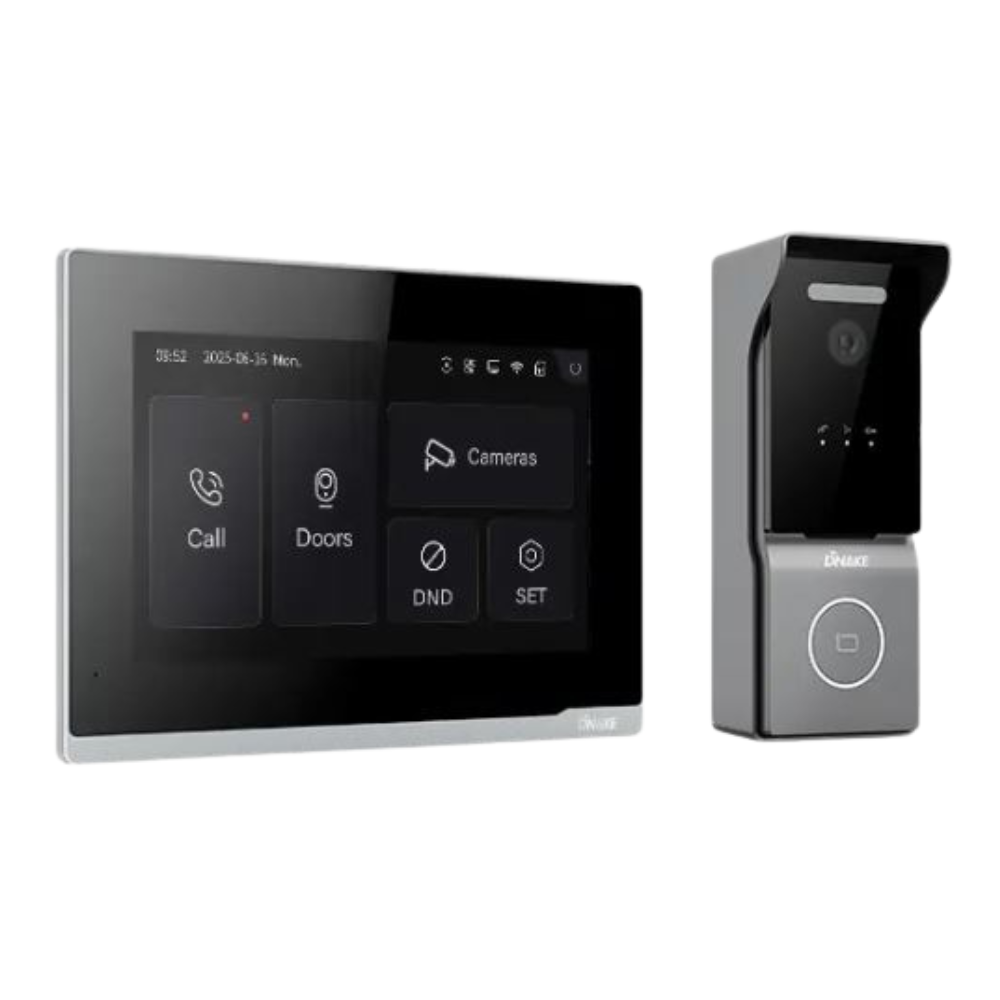
Choose a DNAKE video intercom around how visitors call and how residents or staff enter. The DNAKE S215 combines a 4.3-inch display with card, PIN, and mobile access. The DNAKE S615 adds facial recognition in a 4.3-inch format, while the DNAKE S617 pairs facial recognition with an 8-inch display. Your indoor monitor, app access, and installation requirements complete the decision.
Read the guide to DNAKE for background on DNAKE and the wider product range.
Compare DNAKE Door Station Features
Start with the entrance device. A door station handles visitor calls and supported entry credentials; an indoor monitor lets someone inside answer those calls. A larger screen or additional access method may justify a different door station, but neither automatically makes it the best fit for every property.
|
Door station |
Key features |
When to consider it |
|---|---|---|
|
DNAKE S215 |
4.3-inch display; mechanical keypad; card, PIN, app, and Bluetooth access |
You want video calling and familiar keypad entry without making facial recognition a requirement. |
|
DNAKE S615 |
4.3-inch display; facial recognition; wide dynamic range (WDR) camera; card, PIN, app, and Bluetooth access |
You want facial recognition while retaining a smaller display format. |
|
DNAKE S617 |
8-inch display; dual 2MP cameras; WDR; facial recognition and alternative entry methods |
You want a larger outdoor interface alongside facial recognition. |
The DNAKE S215 door station uses a Linux platform and has a 2MP camera with a 110-degree horizontal viewing angle. Its mechanical buttons can suit an entrance where visitors and regular users expect keypad interaction. Select it for the access methods you need, then check the camera view at the proposed mounting position.
The DNAKE S615 door station is the relevant comparison when facial recognition is a requirement and a 4.3-inch display is sufficient. DNAKE lists wide dynamic range, or WDR, which helps handle bright and dark areas in the same image. Confirm the view and lighting at your entrance rather than choosing by camera resolution alone.
The DNAKE S617 door station provides an 8-inch display and dual 2MP cameras. Consider it when a larger interface matters to the people using the entrance. Compare the mounting space and interaction style with the DNAKE S615 before deciding. The DNAKE S617 Pro is a separate model, so check the exact product name when comparing specifications.
Compare DNAKE H616 and DNAKE H618 Indoor Monitors
Compare the DNAKE H616 and DNAKE H618 after deciding where calls will be answered. A fixed indoor monitor gives occupants or reception staff a dedicated station. App access serves a different use case: answering when the person is away from that station. Confirm whether the proposed package supports one or both.
The DNAKE H616 has an 8-inch IPS touchscreen with a 1280 × 800 resolution and supports landscape or portrait interface layouts. The DNAKE H618 has a larger 10.1-inch IPS touchscreen with the same resolution. Its larger viewing area does not add pixels.
Both support surface or desktop mounting and monitoring of up to 16 IP cameras. That capacity does not establish compatibility with every camera. Check the camera models and connection requirements for the actual installation. Wi-Fi is an option in the manufacturer's specifications, so verify the exact monitor variant instead of assuming every DNAKE H616 or DNAKE H618 includes it.
For a reception desk, compare the space available, viewing distance, and mounting arrangement. For a home, decide whether the monitor should sit near the entrance or in a room where calls are likely to be answered. These choices are more useful than treating the largest screen as an automatic upgrade.

Compare DNAKE Entry Methods for Your Property
The DNAKE S215, DNAKE S615, and DNAKE S617 all list card, PIN, app, and Bluetooth entry options. The DNAKE S615 and DNAKE S617 also list facial recognition. Choose the methods you will actually administer: staff cards, a resident's mobile access, or visitor entry after an answered call can serve different needs.
Facial recognition is one selection criterion. Also decide how someone enters if they do not use that method, who enrolls or removes users, and how temporary access is managed. Multiple available entry methods do not necessarily mean that two credentials must be presented together; confirm the required authentication workflow with the installer.
DNAKE lists SIP support for these door stations, which is relevant when connecting intercom calling with other compatible equipment. Ask the installer to confirm the exact phone, monitor, or platform and the functions required. A shared protocol name alone is not a promise that every feature will work across brands.
Check DNAKE Smart Pro App Access and Cloud Licensing
The DNAKE Smart Pro app supports functions such as receiving door-station calls, viewing video, and remotely unlocking an entrance in a compatible configured system. DNAKE's cloud platform also provides management functions for property managers and installers. Distinguish the resident's app experience from the tools used to administer the property.
Check the licenses and users included with the exact All Security Equipment package. The reviewed DNAKE S617 listing separates app-related options, an optional VoIP license, and indoor monitors. A door-station price therefore does not establish the cost of every answering method or accessory. Request a quote that identifies included access and any additional services.
If users prefer a monitor or telephone over a smartphone app, establish that requirement before choosing the package. Have the installer demonstrate the intended call path and door-release action. For remote features, also ask what happens when the property's internet connection is unavailable.
Compare the Complete DNAKE Installation
Request a DNAKE system proposal that identifies:
-
The exact door station and surface or flush mounting arrangement, with the required mounting accessories.
-
The indoor monitor variant, app access, or telephone answering option for each intended user group.
-
Network connections, the required power source, and compatibility with the existing wiring.
-
The lock or gate interface, its power requirements, and the components included in the installation quote.
-
Configuration, user enrollment, license terms, and support after installation.
Existing two-wire cabling requires a separate compatibility assessment. DNAKE offers a dedicated two-wire IP product family; that does not mean an Ethernet door station can connect directly to any old pair of wires. Likewise, a Wi-Fi option on an indoor monitor does not make every part of the entrance system wireless.
Once those requirements are clear, use All Security Equipment's DNAKE collection to review the available packages. Bring the door-station choice, monitor requirements, preferred entry methods, and installation details into the quote so the comparison reflects the system you will use.
DNAKE Video Intercom Comparison Questions
Do all DNAKE video intercoms include facial recognition?
No. The DNAKE S615 and DNAKE S617 list facial recognition, while the DNAKE S215 lists card, PIN, app, and Bluetooth access.
What is the difference between DNAKE H616 and DNAKE H618?
The DNAKE H616 has an 8-inch display, while the DNAKE H618 has a 10.1-inch display; both list 1280 × 800 resolution and surface or desktop mounting. Check the ordered variant for optional Wi-Fi and other features.
Can the DNAKE Smart Pro app replace an indoor monitor?
A compatible setup can use the DNAKE Smart Pro app to answer calls and unlock the entrance. Confirm that the selected package, configuration, and licenses support your intended app-only use before omitting a monitor.